How to order flowers online: 3 Easy Steps
Ordering flowers online doesn't have to be daunting. Grab these tools to quickly place a flower order you're sending to your mom, your daughter, your grandchild's graduation or simply a thank you to a neighbor for keeping an eye on your home while you were gone. Oh and never send "sorry" flowers. That's a separate blog post.
Avoid getting ensnared by the "order gatherers" as professional florists call them in the industry. That is the polite term. There are other terms that are inappropriate to mention here.
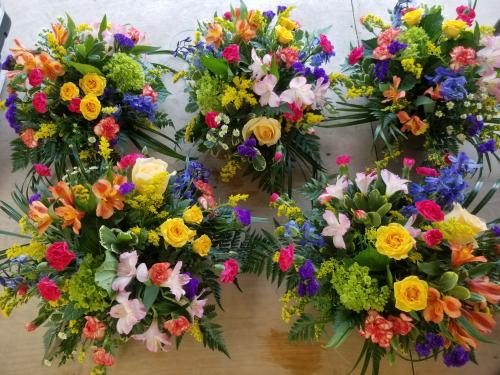
Pretty flowers designed by an actual florist.
Customers of all ages have come to me explaining their difficulties placing orders online since I opened in 2004. I've heard the same tale over and over. It goes like this: "I ordered flowers online(from the order gatherer) but the recipient never received them. "I'm trying to get my money back and can't get through". or "I thought I was on your website" (they were not). Here is what is happening.
The order gatherers pay for "sponsored results" to appear at the top of the page when you begin your search. The listing may say "Enfield delivery today", "Enfield local florist", "Same day Enfield florist delivered" or "voted #1 local florist" or some other false statement.
These listings are not florists. They are corporate call centers with no actual flowers, designers or delivery vehicles. They engage in unethical, and in the state of NH, illegal advertising practices, deceiving the consumer in to thinking they are a local florist in the place you're searching.
If you've skipped the juicy part above, that's ok, it's good time management. Here are the 3 easy steps.
SPONSORED=SCROLL PAST
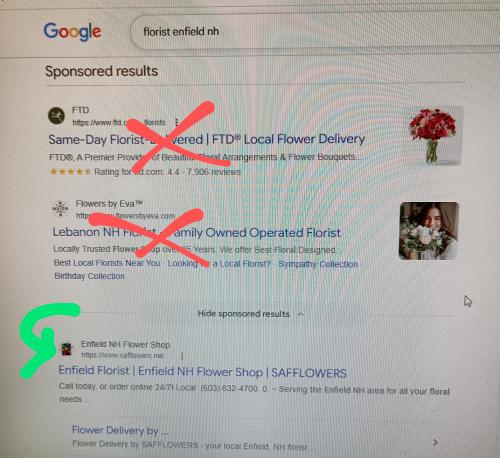
1. In your search engine, let's just say it's google, type in; for example Florist/Enfield/NH or Florists near me, scroll down past the sponsored listings you see at the top of the page and click on a florist below that section. You may see a heading that says 'Places'. These ARE local florists and you'll see a map to the right with the florist's google business listing. In this case, click on their 'website' tab.
2. Make sure the florist you pick has a physical address listed on their website. It should be in the same area as your search town. If there is no physical address, click out of there at warp speed! If you avoid the sponsored listings, you shouldn't have this issue.
3. Once you've picked your florist, choose an arrangement, click 'buy' and fill out the information requested. It's important to remember to include the recipient's phone #. Flowers won't be left outside without the recipient knowing. I did this once years ago when the sender said "Oh, just leave it on the doorstep" and the people were on vacation. Also keep in mind that designer's choice allows for creativity which is the heart of what we do!
You made to the end! If you're ordering flowers for delivery in NH to Enfield, Canaan, Orange, Grafton, Lebanon, West Lebanon, Hanover or Etna keep our website address handy. WWW.SAFFLOWERS.NET